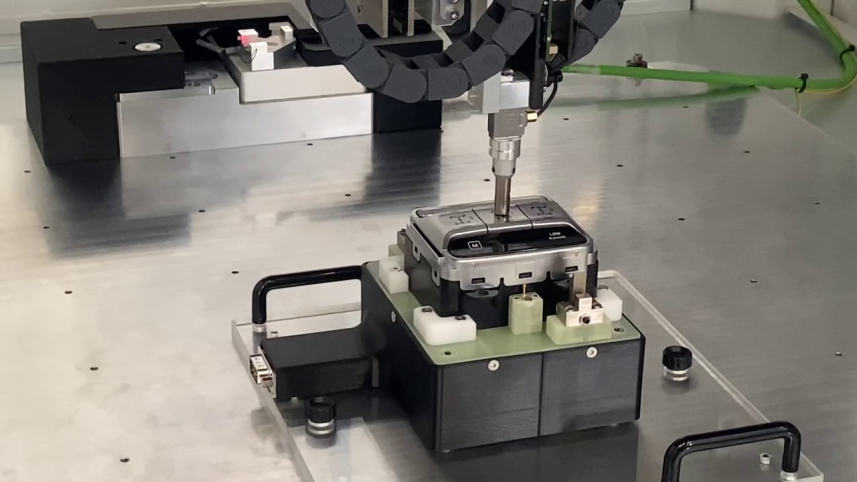
Touch and proximity HMI testing: why a robot is needed
When an HMI is touch or proximity based, the question is not whether it works.
The real question is whether it works every time, in all expected conditions, even the more stringent in terms of timing and applied force.
Inside a vehicle cockpit, this matters. A command that reacts late, or triggers when it should not, becomes both a safety risk and a perceived quality issue. As interfaces move away from physical buttons toward capacitive and reconfigurable surfaces, manual testing reaches its limits. Not because people lack skill, but because they cannot guarantee repeatability.
What manual testing cannot give you
Think about three common test scenarios:
- Fast repeated touches, with controlled interaction rate, to check whether the HMI misses inputs at higher interaction speeds.
- Controlled force pressures to check if the HMI responsiveness matches with customer expectations and to compare different UI samples.
- Proximity approaches with reproducible trajectory to verify thresholds, in terms of distance and approaching speed, and false activations.
All of these can be only partially and roughly done through manual testing.
What cannot be done manually is repeat them in exactly the same way hundreds of times, and then repeat them again weeks later. And it that’s not all. All these operations can be done without requiring human interactions during totally automatic test sessions in an integrated HIL test bench.
Touch and Proximity HMI Robot Tester: what it does in practice
This system automates those gestures and turns them into measurable data. It uses a software controlled electromechanical arm, with fingers, customizable in terms of size and surface coating. The goal is not simply to press a point on a screen, but to reproduce a human interaction with controlled parameters, so each variable can be isolated and analyzed. The system focuses on four main variables: position, force, gesture dynamics and characteristics of the contact surface.
Position
This is important when you need to consistently reach the same point, even on small or closely spaced user interface elements, but it is equally critical to evaluate pressure detection across the entire surface of the HMI with high accuracy and reproducibility.
- X and Y accuracy: 60 µm.
- Z axis accuracy: 20 µm.
This allows testing of sensitive areas and interface boundaries excluding uncovered scenarios.
Force
Force control, thanks to an integrated load cell, is essential for evaluating the responsiveness of HMI. It is even more important if the DUT is equipped with a force sensor whose correct reading shall be guaranteed.
- Configurable range: 10 gF to 1,500 gF.
- Accuracy: ±5 gF.
The value here is not only the force itself, but the ability to fix it and repeat it, then change one parameter at a time and observe the outcome.
Speed and press timing
These parameters matter when timing is as critical as contact.
- Approach speed: 0 to 0.6 m/s
- Short press duration: down to 25 ms, useful for debounce time analysis.
The configurable approach speed allows you to verify proximity behaviour, ensuring that it meets customer constraints, and to perform fine-tuning during the development phase.
The short duration of the pressure allows verification that the DUT is capable of filtering out unintended pressure detection without compromising system responsiveness.
Customizable fingers
The HMI Robot Tester is equipped with a finger connected to the electromechanics arm by a magnet. This mechanism allows the finger to be easily replaced with another one with different characteristics in terms of material, dimensions, shape and coating material.This allows HMI interaction to be tested by simulating the variability of human fingers. It also ensures correct pressure recognition even in the presence of a coating material that simulates gloves.
What changes for R&D teams and OEMs
Used correctly, this is not a machine designed only to speed things up. It is a tool to remove ambiguity.
- Fewer unnecessary iterations, because tests are comparable.
- Higher quality data, because results are repeatable.
- Shorter validation cycles, thanks to automated test sequences that would take much longer manually.
There is also a practical benefit that always matters. When a problem has to be discussed across teams or with a supplier, repeatable tests prevent discussions based on personal perception.
Current application areas
Within the automotive domain, the typical use cases are clear.
- Touch displays and infotainment systems.
- Proximity based cockpit controls.
- Reliability testing of safety related commands.
Here the question is not whether the UI looks good. It is whether the command behaves consistently.
Closing thoughts
Modern HMIs require a different validation approach compared to physical buttons. One that is measurable, repeatable and comparable. The Touch and Proximity HMI Robot Tester is designed for this purpose: controlling position, force and gesture dynamics with clear parameters, so test results are not affected by human variability. If you want to understand how to design a test campaign aligned with your specific use case, get in touch. We can review requirements, sequences and validation parameters together.